
Enterprise AI Development Platform Features for Agentic Workflows
Which enterprise AI development platform features come first? A three-stage ladder for agentic workflows, plus a script to test yours.
An enterprise AI development platform is the layer that lets teams run AI agents on real software work, with plans, checks and records around every change. Most feature lists treat every capability as equal, but they are not equal.
Some features keep agents under control on day one. Others only pay off once several agents run side by side.
This article ranks enterprise AI development platform features in the order a team needs them. It also shows how to test a workflow against that order with a short script. Read it before you build a vendor shortlist.
What Is an Enterprise AI Development Platform for Agentic Workflows?
An enterprise AI development platform gives engineering teams one governed place to plan, build, verify and release software with AI agents. A coding assistant suggests lines to one developer.
An agentic workflow platform runs a whole task instead. It reads an approved plan, assigns agents, checks their output and hands the result to a person. This difference matters because agents act on your systems.
The platform must therefore decide what they may touch and who signs off. Features exist to answer those two questions.
Quick check: Is a coding assistant enough?
No. An assistant helps one person type faster. A platform controls what agents do across a whole team.
Which Enterprise AI Development Platform Features Come First?
Teams often ask for every feature at once. That approach fails, because some features depend on others. The AI platform maturity model below is this article's own way to order them. Each stage closes the gap that the previous stage leaves open.
| Stage | Features | Failure it prevents |
|---|---|---|
| 1 Control | Plan approval gate, acceptance criteria, verifier agents | Agents build the wrong thing and nobody notices |
| 2 Isolation | Scoped workspaces, parallel agent tracks, integration check | Agents overwrite each other's work |
| 3 Evidence | Evidence retention, approval routing, release gate | Nobody can show who approved a release, or why |
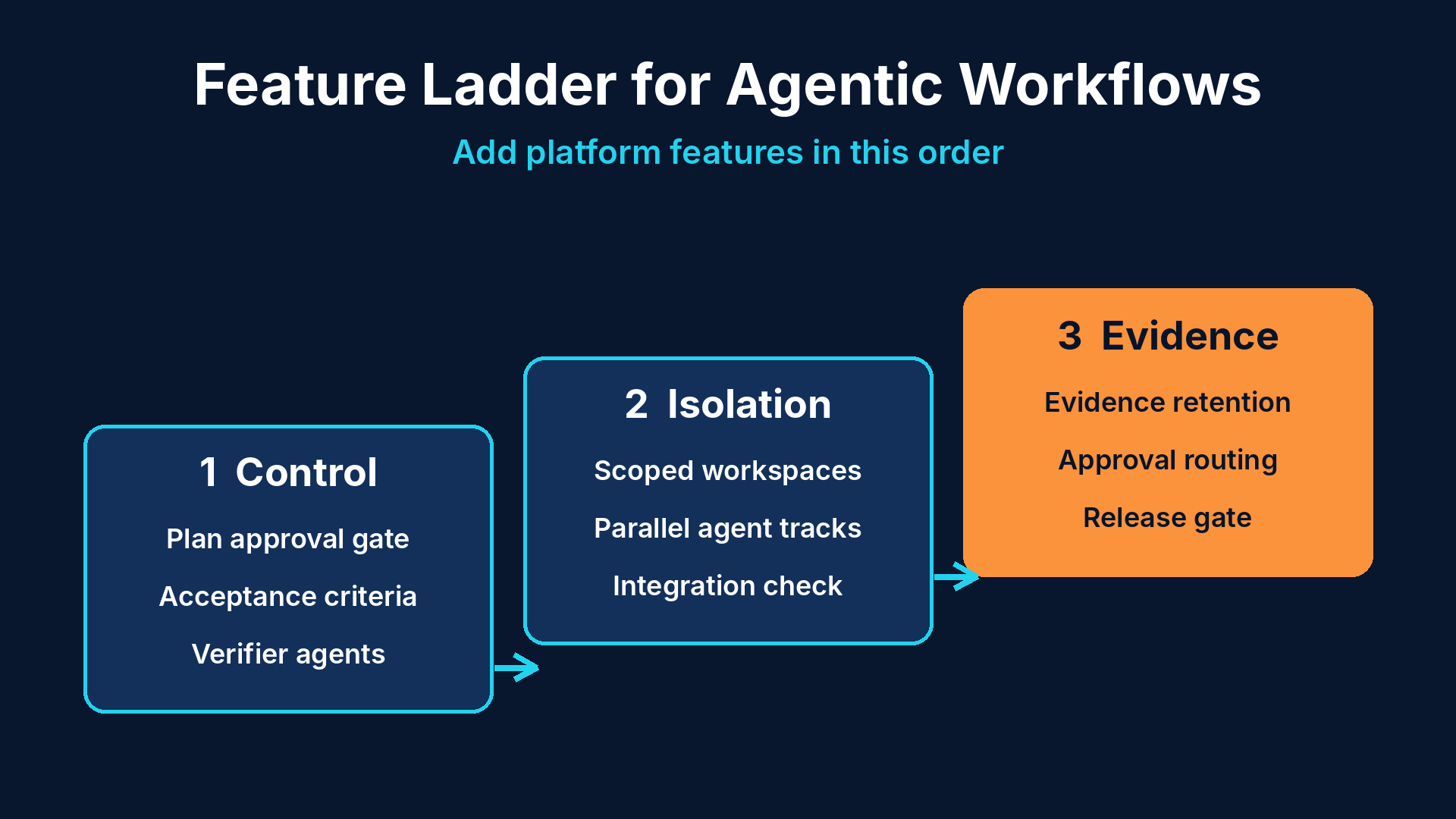
Skip Stage 1 and every later feature only adds speed to poor output. Start with the plan approval gate. No agent builds until a named person approves the plan.
Pair the gate with acceptance criteria written as testable statements, such as "returns 429 after 100 requests per minute".
Verifier agents then score each result against those criteria before anything moves forward.
What Must the Platform Isolate When Agents Run in Parallel?
Stage 2 begins when an enterprise AI development platform runs more than one agent at a time.
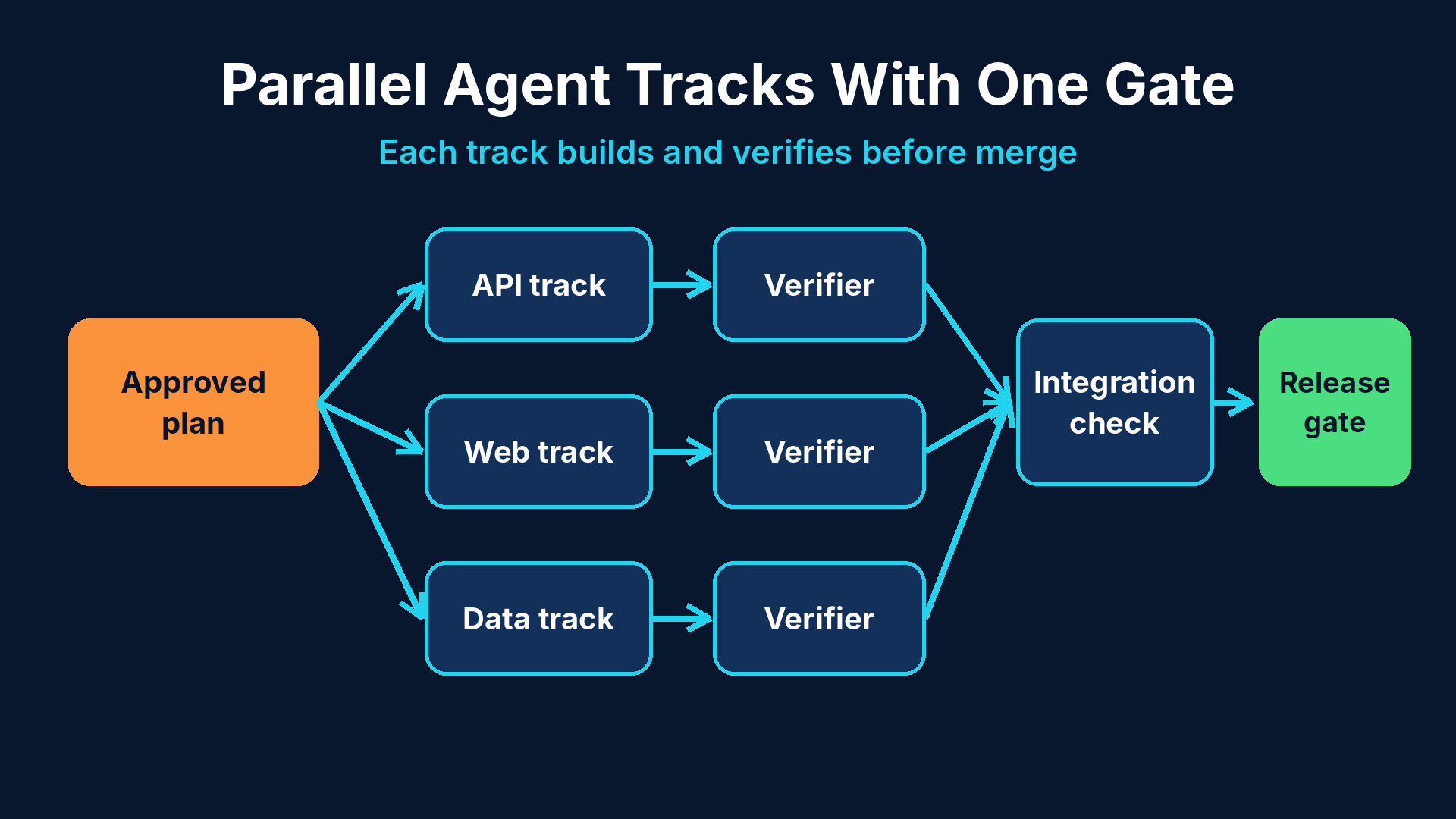
Parallel agent tracks let a backend agent and a web agent work from the same approved plan at once. That only works when each track has a scoped workspace, meaning its own folders and permissions.
Without that, two agents edit the same file and the merge becomes the bottleneck. An integration check then runs the tracks together before the final verification.
This is the practical core of AI-native development. Engineers set the direction, agents run in parallel, and every result is scored before release.
Quick check: Do parallel tracks need separate repositories?
No. They need separate scopes. Folders and permissions are often enough.
How Do You Lint a Workflow Against the Ladder?
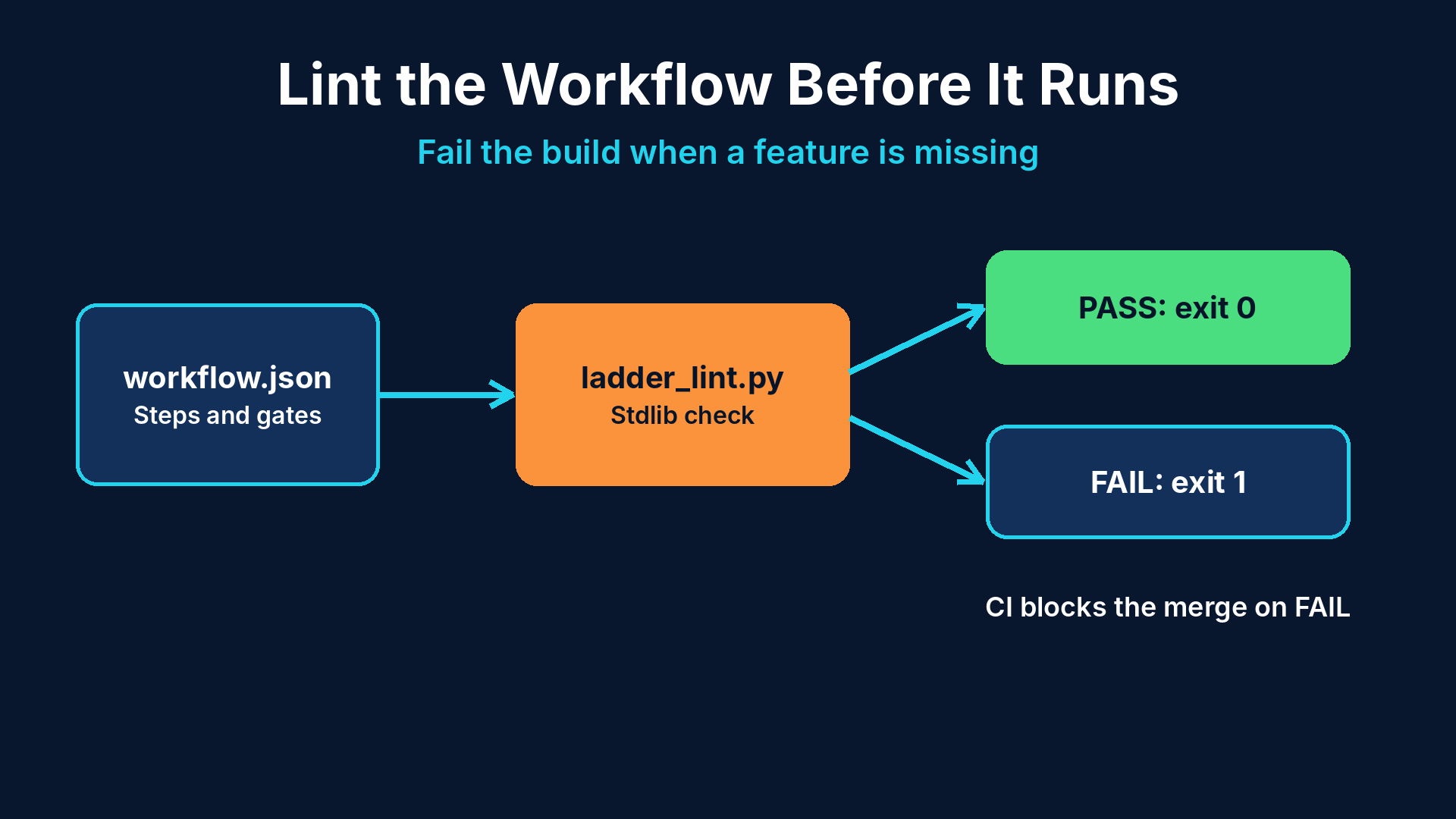
You can test a workflow definition against the ladder before any agent runs it, whichever enterprise AI development platform you use. The script below reads a JSON workflow and works out which features it contains from its steps.
It then prints PASS or FAIL for each stage. It uses only the Python standard library. It exits with code 1 on failure, so CI can block the merge.
"""ladder_lint.py - check an agentic workflow definition against the feature ladder.

Usage: python ladder_lint.py [workflow.json | -] [target_stage 1-3]
Exit code 0 when every feature up to the target stage is present, 1 otherwise.
"""
import json
import sys

LADDER = {
    1: ["plan_approval_gate", "acceptance_criteria", "verifier_agent"],
    2: ["scoped_workspaces", "parallel_tracks", "integration_check"],
    3: ["evidence_retention", "approval_routing", "release_gate"],
}

SAMPLE = {  # illustrative workflow: add rate limiting to a billing API
    "name": "billing-rate-limit",
    "steps": [
        {"id": "plan", "kind": "plan", "approver": "product_owner",
         "criteria": ["returns 429 after 100 requests per minute", "existing tests pass"]},
        {"id": "build_api", "kind": "build", "workspace": "svc/api", "needs": ["plan"]},
        {"id": "build_ui", "kind": "build", "workspace": "web", "needs": ["plan"]},
        {"id": "verify", "kind": "verify", "min_score": 0.9,
         "needs": ["build_api", "build_ui"]},
    ],
}


def steps_of(wf, kind):
    return [s for s in wf["steps"] if s["kind"] == kind]


def present_features(wf):
    plans, builds = steps_of(wf, "plan"), steps_of(wf, "build")
    verifies, releases = steps_of(wf, "verify"), steps_of(wf, "release")
    build_ids = {b["id"] for b in builds}
    spaces = [b.get("workspace") for b in builds]
    found = set()
    if plans and all(p.get("approver") for p in plans) and \
            all("plan" in b.get("needs", []) for b in builds):
        found.add("plan_approval_gate")
    if plans and all(p.get("criteria") for p in plans):
        found.add("acceptance_criteria")
    if any("min_score" in v and build_ids <= set(v.get("needs", [])) for v in verifies):
        found.add("verifier_agent")
    if builds and all(spaces) and len(set(spaces)) == len(spaces):
        found.add("scoped_workspaces")
    if len(builds) >= 2 and all(not (set(b.get("needs", [])) & build_ids) for b in builds):
        found.add("parallel_tracks")
    if steps_of(wf, "integrate"):
        found.add("integration_check")
    if wf.get("evidence", {}).get("retain_days", 0) > 0:
        found.add("evidence_retention")
    if releases and all(r.get("approvers") for r in releases):
        found.add("approval_routing")
    if any(r.get("needs") for r in releases) and verifies:
        found.add("release_gate")
    return found


def main():
    wf = json.load(open(sys.argv[1])) if len(sys.argv) > 1 and sys.argv[1] != "-" else SAMPLE
    target = int(sys.argv[2]) if len(sys.argv) > 2 else 3
    found, ok = present_features(wf), True
    for stage in range(1, target + 1):
        missing = [f for f in LADDER[stage] if f not in found]
        ok = ok and not missing
        print(f"Stage {stage}: {'PASS' if not missing else 'FAIL'}"
              + (f" - missing {', '.join(missing)}" if missing else ""))
    sys.exit(0 if ok else 1)


if __name__ == "__main__":
    main()
The sample workflow inside the script is illustrative, not a customer case. It adds rate limiting to a billing API. Running it with no arguments gives this real output:
Stage 1: PASS
Stage 2: FAIL - missing integration_check
Stage 3: FAIL - missing evidence_retention, approval_routing, release_gate
The sample passes Stage 1 because its plan has an approver and criteria, and a verifier scores both builds. It fails Stage 2 because no integration step exists. It fails Stage 3 because nothing keeps evidence, routes approvals or gates the release. Each message names the exact feature to add next.
Quick check: Should every workflow pass Stage 3?
No. Set the target stage per workflow. Low-risk changes can stop at Stage 2.
What Changes When Auditors and Release Managers Get Involved?
Stage 3 matters once someone asks you to explain a release after the fact. Evidence retention keeps the plan, the verifier scores and the approver for a set period.
Approval routing sends each release to the right approvers based on the type of change. A release gate then blocks the release step unless verification passed.
These three features turn a good process into one you can prove. Keep them short and automatic, because manual evidence collection rarely survives a busy quarter.
Quick check: Is evidence retention only for regulated teams?
No. Any team that must explain a release later benefits from it.
Which Single Feature Gap Should You Close This Quarter?
Run the lint script on your three busiest workflows and count the failures per stage. Close the earliest failing stage first, because later features depend on it.
If Stage 1 fails, add the plan approval gate this quarter and change nothing else.
If Stage 1 passes and Stage 2 fails, give each agent a scoped workspace before you add more agents.
When both pass, connect the release gate to the verification score so a failing result cannot ship.
Review the lint output at the end of the quarter, and raise the target stage only when workflows pass consistently.
When comparing any enterprise AI development platform, ask the vendor to demonstrate the feature at your current stage rather than walk through the full list.
Xccelera is a company that works on platform-led software development with engineers and AI agents, which is the area this ladder describes.
About the author
- Xccelera AI is an enterprise agentic AI platform for building, orchestrating, integrating and scaling AI agents, from AI transformation strategy to production software engineering. Our platform and packaged agents (voice, ERP, ITSM, clinical assist, negotiation) come with human approval checkpoints, isolated execution and an audit-ready evidence trail for every run. Here we share engineering deep-dives on agent design, orchestration and observability. xccelera.ai
Comments
Join the discussionNo comments yet. Be the first to comment.